AI & the Modern Web: Webinar Recap and Our Drupal AI QuickStart Package


Table of Contents
Note: This blog was first published on October 9, 2025, and has been updated to reflect new information and insights.
Innovation meets action: recapping our AI webinar
On October 1, 2025, Promet Source hosted AI and the Modern Web: Smarter Sites, Better Experiences, a live session on practical AI tools for the people who build and manage Drupal sites. Drupal trainer Rod Martin worked inside a live Drupal site to show how editors can reformat and summarize content, rewrite dense text in plain language, fill in SEO metadata and generate image alt text. In every demo, a person reviews the AI draft before anything is published.
Presented by Rod Martin, a Drupal trainer and site builder who has used Drupal since 2005, taught it since 2011 and introduced around 50,000 people to Drupal through online training, DrupalCons and DrupalCamps. Hosted by Eugenia Viti of Promet Source.
Why this matters now
Residents increasingly start with AI tools. Pew Research Center reported in June 2026 that 42% of U.S. adults use AI chatbots to search for information, so the clarity of agency content shapes the answers residents get wherever they ask. Our CEO, Andrew Kucharski, explores what that means for public information in Your Residents May Never See Your Government Homepage. They Still Need the Right Answer.
Watch the plain-language rewrite demo (starts at 19:52).
What the session covered
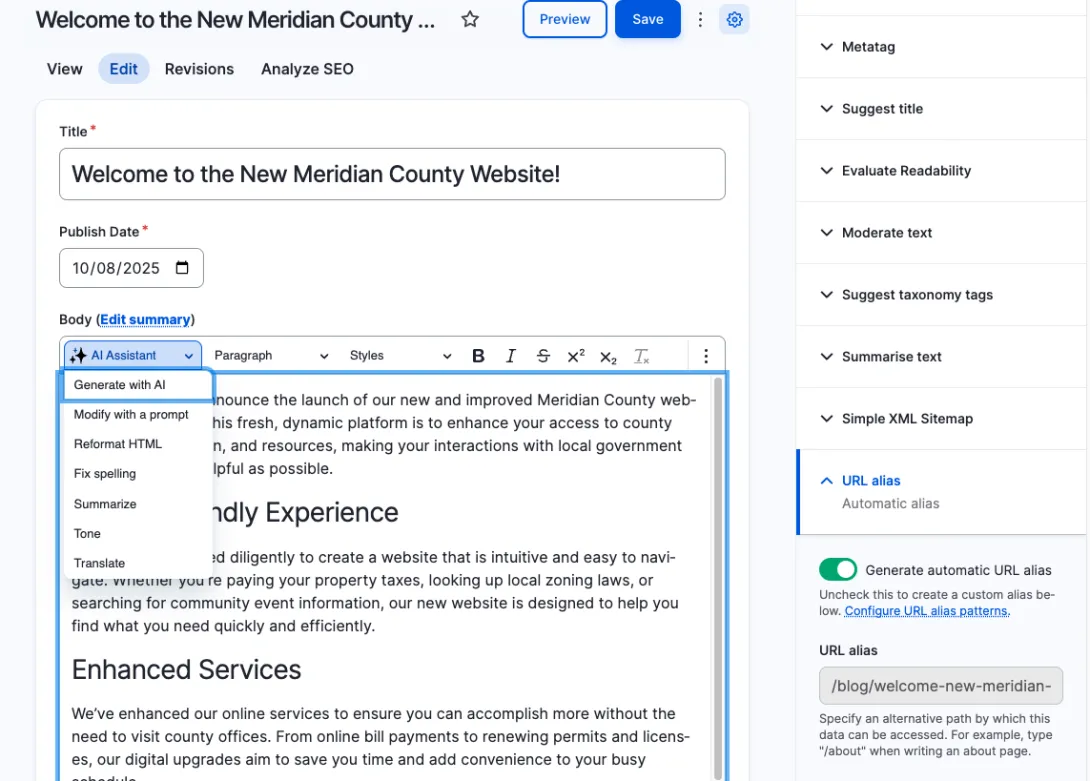
Rod worked through each tool inside a Drupal editing screen. Every AI result appeared as a draft he could edit, commit or discard, which he described as keeping a human in the loop.
Clean, semantic formatting (14:20)
The Reformat HTML tool in the CKEditor AI assistant turned plain paragraphs with bolded text into proper headings and paragraphs. Rod checked the output in a preview window and fixed a heading before committing it to the page.
Summaries (16:31)
The Summarize tool condensed a long article into a shorter version in a separate window, ready to use or discard.
Brand voice (17:33)
Teams can store tone-of-voice descriptions in a Drupal taxonomy, then use Change the Tone to rewrite text to match. Rod called brand voice consistency the top issue for large agencies and enterprises with many editors.
Readability and plain language (19:52)
Evaluate Readability scored the sample article at 33.9, "very difficult to read and best understood by university graduates." A prompt then rewrote it for a seventh-grade reading level while keeping dates, names, places and key events intact. Rod's advice was to trust but verify, and to check the result with a second tool.
Tags and titles (23:41)
AI suggested taxonomy terms and a shorter, clearer page title from the body text, which editors can copy in and adjust.
SEO metadata with Metatag AI (25:56)
Promet Source's contributed Metatag AI module filled in the page title, description, abstract and keywords from the page content in a couple of seconds, work that usually takes several minutes by hand.
Automatic image alt text (27:52)
On upload, AI drafted alt text for an image. When it described the photo without naming the person shown, Rod corrected it before saving.
Content from a prompt (29:48)
The AI assistant drafted a new article from a prompt inside the editor, where Rod could revise it before committing it. Drupal AI works with the large language model a team chooses.
Field automations for social posts (31:11)
Using AI Automators, Rod set up a field that drafts a LinkedIn post from an article's body text in under six minutes, and showed a second field that drafts posts for X. Each draft stays editable before anyone copies it to a social channel.
What attendees told us
In the first live poll, attendees named trust and ethics as their biggest challenge with AI, with change management also near the top. Asked which task they would automate first, most chose data entry and reporting, followed by quality assurance.
Drupal AI QuickStart Package
Every tool in the webinar runs inside Drupal once it's set up. The Drupal AI QuickStart Package handles that setup for your team, so editors can start using AI in their daily work within days, with a person reviewing every draft before it's published.
Part 1: Setup and configuration
- Install and configure up to eight Drupal AI modules, chosen for how your team works. Modules shown in the webinar include the CKEditor AI assistant, AI Content Suggestions, AI Automators, Metatag AI, and AI Image Alt Text.
- Connect your site to the large language model provider your organization approves.
- Configure up to five AI-powered fields, such as page summaries, plain-language rewrites, SEO keyword suggestions, FAQ drafts and expanded explanations that make content easier to understand.
- Test, validate, and document every installation.
Part 2: Team training (optional)
- One or two live training sessions, recorded so new team members can watch later.
- A guided walkthrough of each module and field.
- An introduction to prompt writing, with templates that return consistent, on-brand results.
- Live Q&A built around your team's own pages and use cases.
What your team receives
- Up to eight installed and configured AI modules
- Up to five configured AI-powered fields
- Setup and usage documentation
- Training recordings (with Part 2)
- A quick-reference guide for prompts and workflows
Related reading: Your Residents May Never See Your Government Homepage. They Still Need the Right Answer. by Andrew Kucharski, and our AI Solutions for government and higher education.
Frequently asked questions
What can Drupal AI tools do for content editors?
Drupal AI adds tools inside the editing screen that content teams already use. In Promet Source's AI & the Modern Web webinar, Rod Martin used them to reformat content into proper headings, summarize long text, rewrite a dense article for a seventh-grade reading level, fill in SEO metadata with Metatag AI and draft image alt text.
Who reviews AI-generated content before it goes live?
The editor does. In the webinar, every AI tool returned a draft that could be edited, committed or discarded, so nothing reached the page until a person approved it. Keeping that review with the content team keeps accuracy with the people accountable for public information.
How quickly can a team start using AI in Drupal?
Through the Drupal AI QuickStart Package, Promet Source installs and configures up to eight AI modules and up to five AI-powered fields, documents the setup, and offers optional recorded training. Most content teams can start using AI in their Drupal site within days.
Bring AI into your Drupal site
Our team configures AI modules and fields in your Drupal site, documents the setup, and trains your editors to use it with confidence. Most teams can start using AI within days.
Rod was born in Australia, raised in Canada and now lives in the United States. He holds two masters degrees and has been teaching Drupal since 2011.




Get our newsletter
Get weekly Drupal and AI technology advancement news, pro tips, ideas, insights, and more.